imgx
Package imgx provides comprehensive image processing functions (resize, rotate, crop, brightness/contrast adjustments, effects) and AI-powered object detection using Google Gemini, AWS Rekognition, and OpenAI Vision APIs.
All the image processing functions provided by the package accept any image type that implements image.Image interface
as an input, and return a new image of *image.NRGBA type (32bit RGBA colors, non-premultiplied alpha).
Table of Contents
- Installation
- As a Library
- As a CLI Tool
- Documentation
- CLI Documentation - Complete CLI guide
- Detection API - AI-powered object detection
- Version Management - How versions are managed
- Release Process - How to create releases
- Library Usage Examples
- Quick Start
- Image Resizing
- Image Rotation
- Image Flipping
- Gaussian Blur
- Sharpening
- Color Adjustments
- More Library Usage Examples
- Watermark Example
- Image Transformations
- Effects and Filters
- Advanced Example: Image Collage
- Features
- Performance
- FAQ
- Acknowledgments
- License
Installation
As a Library
As a CLI Tool
# Install via go install (Recommended)
go install github.com/razzkumar/imgx/cmd/imgx@latest

# Or build from source
go build -o imgx ./cmd/imgx
Quick CLI Examples:
# Resize an image
imgx resize photo.jpg -w 800 -o resized.jpg

# Create a thumbnail
imgx thumbnail photo.jpg -s 150 -o thumb.jpg

# Adjust colors
imgx adjust photo.jpg --brightness 10 --contrast 20 -o adjusted.jpg

# Apply blur effect
imgx blur photo.jpg --sigma 2.5 -o blurred.jpg

# Detect objects using AI (local Ollama by default)
imgx detect photo.jpg

# Extract image metadata (requires exiftool for extended data)
imgx metadata photo.jpg
For complete CLI documentation with all commands, options, and examples, see CLI Documentation.
Documentation
Library API: https://pkg.go.dev/github.com/razzkumar/imgx CLI Tool: CLI.md Object Detection: DETECTION.md - AI vision with Ollama, Google Gemini, AWS Rekognition, OpenAI
Library Usage Examples
A few usage examples can be found below. See the documentation for the full list of supported functions.
Quick Start - Using as a Library
package main

import (
    "log"
    "github.com/razzkumar/imgx"
)

func main() {
    // Load an image file
    img, err := imgx.Load("input.jpg")
    if err != nil {
        log.Fatalf("failed to load image: %v", err)
    }

    // Resize to width 800px, maintaining aspect ratio
    img = img.Resize(800, 0, imgx.Lanczos)

    // Save the result (with automatic metadata tracking)
    err = img.Save("output.jpg")
    if err != nil {
        log.Fatalf("failed to save image: %v", err)
    }
}
Loading Options
You can customize image loading by passing an Options struct:
// Load with auto-orientation
img, err := imgx.Load("photo.jpg", imgx.Options{
    AutoOrient: true,  // Apply EXIF orientation
})

// Load with custom author
img, err := imgx.Load("photo.jpg", imgx.Options{
    Author: "Your Name",  // Override default author in metadata
})

// Load with multiple options
img, err := imgx.Load("photo.jpg", imgx.Options{
    AutoOrient:      true,
    Author:          "John Doe",
    DisableMetadata: false,  // Enable/disable metadata tracking
})

// Or just use defaults (no options needed)
img, err := imgx.Load("photo.jpg")
Available Options:
- AutoOrient (bool) - Automatically correct image orientation from EXIF data
- Author (string) - Set custom artist/creator name for metadata (empty = use default)
- DisableMetadata (bool) - Disable automatic metadata tracking for this image
Image resizing
// Load an image
img, _ := imgx.Load("input.jpg")

// Resize to size = 128x128px using the Lanczos filter.
img128 := img.Resize(128, 128, imgx.Lanczos)

// Resize to width = 800px preserving the aspect ratio.
img800 := img.Resize(800, 0, imgx.Lanczos)

// Scale down to fit the 800x600px bounding box.
imgFit := img.Fit(800, 600, imgx.Lanczos)

// Resize and crop to fill the 100x100px area.
imgFill := img.Fill(100, 100, imgx.Center, imgx.Lanczos)
Example Output:
Original Image (1280×853):
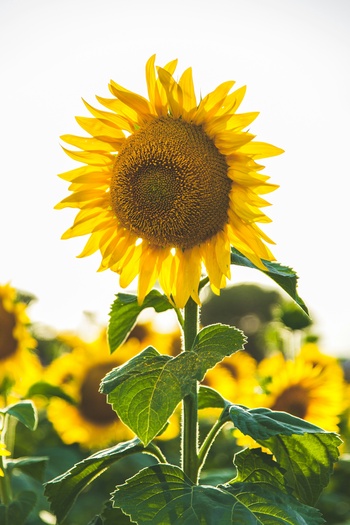
After Resize(src, 200, 0, imgx.Lanczos) - Resized to width 200px, height auto:
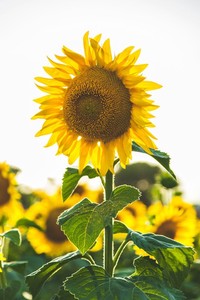
After Fill(src, 300, 300, imgx.Center, imgx.Lanczos) - Square thumbnail 300×300:
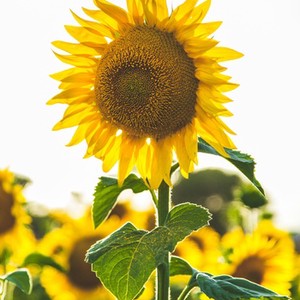
Imaging supports image resizing using various resampling filters. The most notable ones:
- Lanczos - A high-quality resampling filter for photographic images yielding sharp results.
- CatmullRom - A sharp cubic filter that is faster than Lanczos filter while providing similar results.
- MitchellNetravali - A cubic filter that produces smoother results with less ringing artifacts than CatmullRom.
- Linear - Bilinear resampling filter, produces smooth output. Faster than cubic filters.
- Box - Simple and fast averaging filter appropriate for downscaling. When upscaling it's similar to NearestNeighbor.
- NearestNeighbor - Fastest resampling filter, no antialiasing.
The full list of supported filters: NearestNeighbor, Box, Linear, Hermite, MitchellNetravali, CatmullRom, BSpline, Gaussian, Lanczos, Hann, Hamming, Blackman, Bartlett, Welch, Cosine. Custom filters can be created using ResampleFilter struct.
Resampling filters comparison
The same image can be resized using different resampling filters.
From faster (lower quality) to slower (higher quality): NearestNeighbor, Linear, CatmullRom, Lanczos.
Image Rotation
// Load an image
img, _ := imgx.Load("input.jpg")
// Rotate 90 degrees clockwise
**Original Image:**

**After `Blur(src, 2.0)` - Gaussian blur with sigma=2.0:**
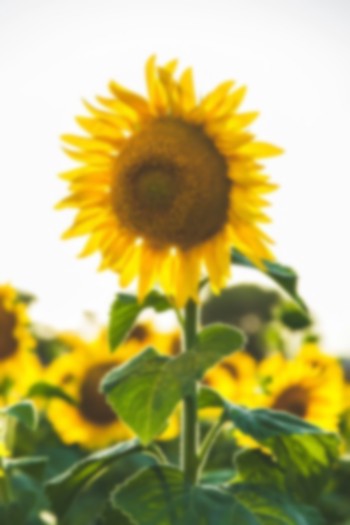
### Sharpening
```go
// Load an image
img, _ := imgx.Load("input.jpg")
// Light sharpening
lightSharp := img.Sharpen(0.5)
// Medium sharpening
mediumSharp := img.Sharpen(1.0)
// Heavy sharpening
heavySharp := img.Sharpen(2.0)
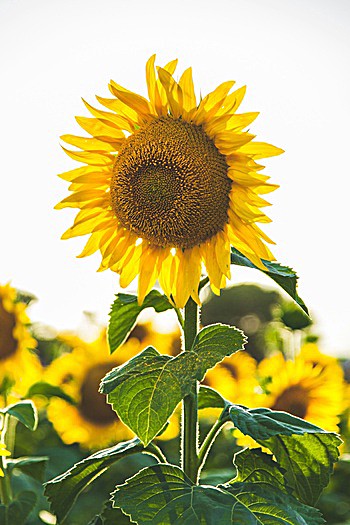
Sharpen uses unsharp mask technique internally. Sigma parameter controls the strength of the sharpening effect.
Example Output:
Original Image:
After Sharpen(src, 1.5) - Sharpened with sigma=1.5:
Color Adjustments
Gamma Correction
// Load an image
img, _ := imgx.Load("input.jpg")

// Darken image (gamma < 1.0)
darker := img.AdjustGamma(0.5)

// Lighten image (gamma > 1.0)
lighter := img.AdjustGamma(1.5)
Contrast Adjustment
// Load an image
img, _ := imgx.Load("input.jpg")

// Decrease contrast
lowContrast := img.AdjustContrast(-20)

// Increase contrast
highContrast := img.AdjustContrast(20)
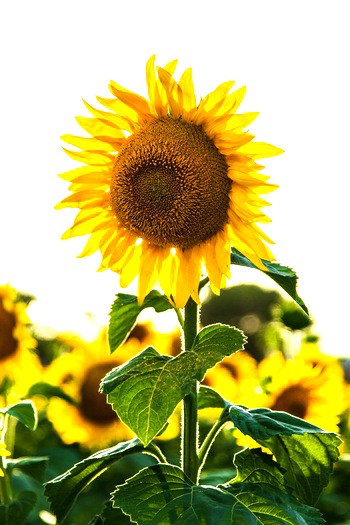
Range: -100 (min contrast) to 100 (max contrast)
Example Output:
Original Image:
After AdjustContrast(src, 30) - Increased contrast:
Brightness Adjustment
// Load an image
img, _ := imgx.Load("input.jpg")

// Decrease brightness
darker := img.AdjustBrightness(-20)

// Increase brightness
brighter := img.AdjustBrightness(20)
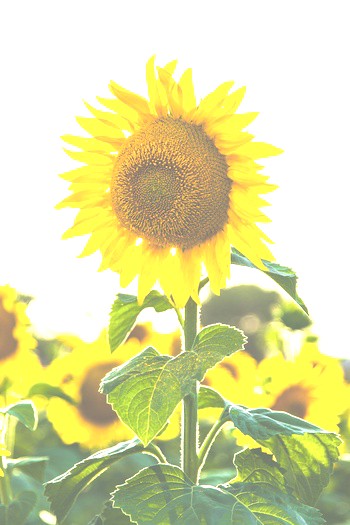
Range: -100 (darkest) to 100 (brightest)
Example Output:
Original Image:
After AdjustBrightness(src, 30) - Increased brightness:
Saturation Adjustment
// Load an image
img, _ := imgx.Load("input.jpg")

// Desaturate (move towards grayscale)
desaturated := img.AdjustSaturation(-50)

// Increase saturation (more vivid colors)
saturated := img.AdjustSaturation(50)

// Complete desaturation
grayscale := img.AdjustSaturation(-100)
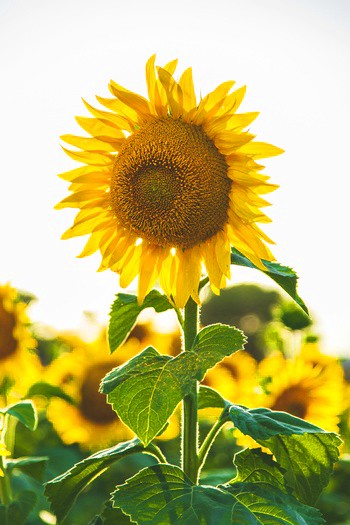
Range: -100 (grayscale) to 500 (highly saturated)
Example Output:
Original Image:
After AdjustSaturation(src, 50) - Increased saturation:
Hue Adjustment
// Load an image
img, _ := imgx.Load("input.jpg")

// Shift hue by 20 degrees
shifted := img.AdjustHue(20)

// Shift hue by 180 degrees (complementary colors)
inverted := img.AdjustHue(180)
Range: -180 to 180 degrees
Grayscale Conversion
// Load an image
img, _ := imgx.Load("input.jpg")

// Convert image to grayscale
gray := img.Grayscale()
Example Output:
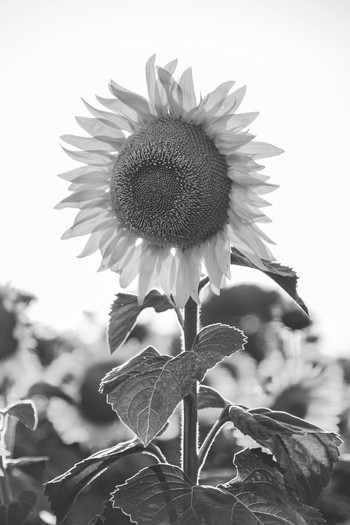
Original Image:
After Grayscale(src) - Converted to grayscale:
Example: Complete color adjustment pipeline with method chaining
// Load and process image with method chaining
img, _ := imgx.Load("input.jpg")

// Adjust multiple properties by chaining methods
result := img.AdjustBrightness(10).
    AdjustContrast(20).
    AdjustSaturation(30)

result.Save("output_adjusted.jpg")
More Library Usage Examples
Example 1: Create Thumbnail Gallery
package main

import (
    "log"
    "github.com/razzkumar/imgx"
)

func main() {
    // Load source image
    img, err := imgx.Load("photo.jpg")
    if err != nil {
        log.Fatal(err)
    }

    // Create different thumbnail sizes
    thumb100 := img.Thumbnail(100, 100, imgx.Lanczos)
    thumb200 := img.Thumbnail(200, 200, imgx.Lanczos)
    thumb400 := img.Thumbnail(400, 400, imgx.Lanczos)

    // Save thumbnails
    thumb100.Save("thumb_100.jpg")
    thumb200.Save("thumb_200.jpg")
    thumb400.Save("thumb_400.jpg")
}
Example 2: Batch Image Processing
package main

import (
    "log"
    "os"
    "path/filepath"
    "strings"
    "github.com/razzkumar/imgx"
)

func main() {
    // Process all JPG files in a directory
    files, _ := filepath.Glob("input/*.jpg")

    for _, file := range files {
        // Load image
        img, err := imgx.Load(file)
        if err != nil {
            log.Printf("Failed to load %s: %v", file, err)
            continue
        }

        // Process with method chaining: resize, enhance contrast, and sharpen
        processed := img.Resize(1920, 0, imgx.Lanczos).
            AdjustContrast(10).
            Sharpen(0.5)

        // Save with new name
        basename := filepath.Base(file)
        outname := "output/" + strings.TrimSuffix(basename, ".jpg") + "_processed.jpg"

        if err := processed.Save(outname); err != nil {
            log.Printf("Failed to save %s: %v", outname, err)
        }
    }
}
Example 3: Add Watermark
package main

import (
    "image"
    "log"
    "github.com/razzkumar/imgx"
)

func main() {
    // Load main image
    img, err := imgx.Load("photo.jpg")
    if err != nil {
        log.Fatal(err)
    }

    // Load watermark
    watermark, err := imgx.Load("watermark.png")
    if err != nil {
        log.Fatal(err)
    }

    // Resize watermark to 20% of image width
    bounds := img.Bounds()
    wmWidth := bounds.Dx() / 5
    watermark = watermark.Resize(wmWidth, 0, imgx.Lanczos)

    // Position watermark in bottom-right corner
    wmBounds := watermark.Bounds()
    position := image.Pt(
        bounds.Dx()-wmBounds.Dx()-20,
        bounds.Dy()-wmBounds.Dy()-20,
    )

    // Overlay watermark with transparency and save
    result := img.Overlay(watermark, position, 0.6)
    result.Save("watermarked.jpg")
}
Example Output:
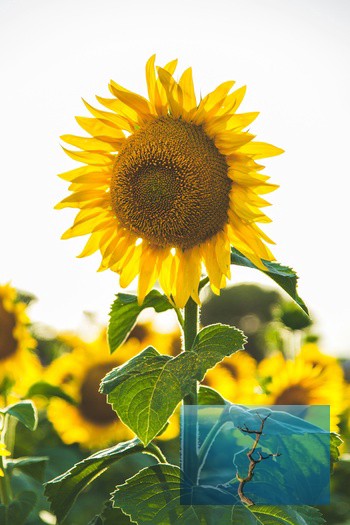
Original Image:
After adding watermark with Overlay() - Watermark in bottom-right corner with 60% opacity:
Example 4: Image Transformations
package main

import (
    "log"
    "github.com/razzkumar/imgx"
)

func main() {
    img, err := imgx.Load("photo.jpg")
    if err != nil {
        log.Fatal(err)
    }

    // Rotate 90 degrees
    img.Rotate90().Save("rotated_90.jpg")

    // Rotate 45 degrees with white background
    img.Rotate(45, imgx.White).Save("rotated_45.jpg")

    // Flip horizontal
    img.FlipH().Save("flipped_h.jpg")

    // Flip vertical
    img.FlipV().Save("flipped_v.jpg")

    // Transpose (flip + rotate)
    img.Transpose().Save("transposed.jpg")
}
Example 5: Image Effects and Filters
package main

import (
    "log"
    "github.com/razzkumar/imgx"
)

func main() {
    img, err := imgx.Load("photo.jpg")
    if err != nil {
        log.Fatal(err)
    }

    // Convert to grayscale
    img.Grayscale().Save("grayscale.jpg")

    // Invert colors
    img.Invert().Save("inverted.jpg")

    // Apply custom convolution (edge detection)
    img.Convolve3x3(
        [9]float64{
            -1, -1, -1,
            -1,  8, -1,
            -1, -1, -1,
        },
        nil,
    ).Save("edges.jpg")

    // Emboss effect
    img.Convolve3x3(
        [9]float64{
            -1, -1, 0,
            -1,  1, 1,
             0,  1, 1,
        },
        nil,
    ).Save("embossed.jpg")
}
Example 6: Working with Different Image Formats
package main

import (
    "log"
    "github.com/razzkumar/imgx"
)

func main() {
    // Load with auto-orientation from EXIF
    img, err := imgx.Load("photo.jpg", imgx.Options{AutoOrient: true})
    if err != nil {
        log.Fatal(err)
    }

    // Process
    processed := img.Resize(800, 0, imgx.Lanczos)

    // Save as different formats (format auto-detected from extension)
    processed.Save("output.jpg")  // JPEG
    processed.Save("output.png")  // PNG
    processed.Save("output.gif")  // GIF
    processed.Save("output.tiff") // TIFF
    processed.Save("output.bmp")  // BMP
}
Example 7: Extract Image Metadata
package main

import (
    "fmt"
    "log"
    "github.com/razzkumar/imgx"
)

func main() {
    // Extract metadata (uses exiftool if available, falls back to basic metadata)
    metadata, err := imgx.Metadata("photo.jpg")
    if err != nil {
        log.Fatal(err)
    }

    // Display basic information (always available)
    fmt.Printf("File: %s\n", metadata.FilePath)
    fmt.Printf("Format: %s\n", metadata.Format)
    fmt.Printf("Dimensions: %dx%d\n", metadata.Width, metadata.Height)
    fmt.Printf("Megapixels: %.2f MP\n", metadata.Megapixels)

    // Display extended metadata if available (requires exiftool)
    if metadata.HasExtended {
        fmt.Println("\nExtended Metadata:")
        if metadata.CameraMake != "" {
            fmt.Printf("Camera: %s %s\n", metadata.CameraMake, metadata.CameraModel)
        }
        if metadata.DateTimeOriginal != "" {
            fmt.Printf("Date Taken: %s\n", metadata.DateTimeOriginal)
        }
        if metadata.ISO != "" {
            fmt.Printf("ISO: %s\n", metadata.ISO)
        }
        if metadata.GPSLatitude != "" {
            fmt.Printf("GPS: %s, %s\n", metadata.GPSLatitude, metadata.GPSLongitude)
        }
    } else {
        fmt.Println("\nNote: Install exiftool for comprehensive metadata")
    }

    // Extract basic metadata only (skip exiftool check)
    basicMeta, err := imgx.Metadata("photo.jpg", imgx.WithBasicOnly())
    if err != nil {
        log.Fatal(err)
    }
    fmt.Printf("\nFile Size: %d bytes\n", basicMeta.FileSize)
}
Example 8: AI Object Detection
package main

import (
    "context"
    "fmt"
    "log"
    "github.com/razzkumar/imgx"
    "github.com/razzkumar/imgx/detection"
)

func main() {
    // Load image
    img, err := imgx.Load("photo.jpg")
    if err != nil {
        log.Fatal(err)
    }

    // Detect objects using the local Ollama model
    ctx := context.Background()
    result, err := img.Detect(ctx, "ollama")
    if err != nil {
        log.Fatal(err)
    }

    // Display detected labels
    fmt.Println("Detected objects:")
    for _, label := range result.Labels {
        fmt.Printf("- %s (%.1f%% confidence)\n", label.Name, label.Confidence*100)
    }

    // Use AWS Rekognition for image properties
    opts := &detection.DetectOptions{
        Features: []detection.Feature{detection.FeatureProperties},
    }
    result, err = img.Detect(ctx, "aws", opts)
    if err != nil {
        log.Fatal(err)
    }

    // Display image properties
    fmt.Printf("\nBrightness: %s\n", result.Properties["brightness"])
    fmt.Printf("Dominant colors: %s\n", result.Properties["dominant_colors"])
}
For complete detection API documentation including all providers, features, and examples, see Detection Documentation.
Automatic Processing Metadata Tracking
imgx automatically tracks all processing operations applied to images and can embed this information as XMP metadata when saving. This feature provides full transparency about how images were processed.
How It Works
When you use the instance-based API (imgx.Load(), method chaining), imgx automatically:
1. Records every operation (resize, rotate, adjust, etc.)
2. Tracks parameters for each operation
3. Timestamps each operation
4. Embeds this information as XMP metadata when saving (if exiftool is available)
Basic Usage
// Load an image - metadata tracking starts automatically
img, _ := imgx.Load("photo.jpg")

// Apply operations - each operation is recorded
result := img.Resize(800, 0, imgx.Lanczos).
    AdjustBrightness(10).
    AdjustContrast(20).
    Sharpen(1.0)

// Save - metadata is automatically embedded in the output file
result.Save("output.jpg")

// The output.jpg file now contains XMP metadata with:
// - Software: imgx v1.0.0
// - Processing history: resize, adjust brightness, adjust contrast, sharpen
// - Parameters for each operation
// - Timestamps for each operation
Disabling Metadata
There are three ways to disable metadata tracking:
1. Per-Image (at load time):
// Disable metadata for a specific image
img, _ := imgx.Load("photo.jpg", imgx.Options{DisableMetadata: true})
img.Resize(800, 0, imgx.Lanczos).Save("output.jpg")  // No metadata written
2. Per-Save Operation:
// Process with metadata tracking, but don't write it
img, _ := imgx.Load("photo.jpg")
result := img.Resize(800, 0, imgx.Lanczos)
result.Save("output.jpg", imgx.WithoutMetadata())  // Skip metadata on save
3. Globally (environment variable):
# Disable metadata for all operations
export IMGX_ADD_METADATA=false

# Or in code:
imgx.SetAddMetadata(false)
Working with Standard Library
The instance-based API is fully compatible with Go's standard image.Image interface:
// Load from standard library image
var stdImg image.Image = loadFromSomewhere()
img := imgx.FromImage(stdImg)

// Process with metadata tracking
result := img.Resize(800, 0, imgx.Lanczos)

// Convert back to standard library type if needed
nrgba := result.ToNRGBA()
Method Chaining
All processing methods return new *imgx.Image instances, allowing for clean method chaining:
img, _ := imgx.Load("photo.jpg")

// Chain multiple operations
result := img.
    Resize(1920, 0, imgx.Lanczos).
    CropCenter(1200, 800).
    AdjustBrightness(10).
    AdjustContrast(15).
    AdjustSaturation(20).
    Sharpen(1.0)

result.Save("processed.jpg")
Migration from Functional API
If you're migrating from the older functional API (imgx.Open, imgx.Resize, etc.), both APIs are still available:
Old (Functional API):
img, _ := imgx.Open("input.jpg")
img = imgx.Resize(img, 800, 0, imgx.Lanczos)
img = imgx.AdjustContrast(img, 20)
imgx.Save(img, "output.jpg")
New (Instance-Based API with metadata):
img, _ := imgx.Load("input.jpg")
img = img.Resize(800, 0, imgx.Lanczos).AdjustContrast(20)
img.Save("output.jpg")
The functional API remains available for backward compatibility but does not include automatic metadata tracking.
FAQ
Incorrect image orientation after processing (e.g. an image appears rotated after resizing)
Most probably, the given image contains the EXIF orientation tag.
The standard image/* packages do not support loading and saving
this kind of information. To fix the issue, try opening images with
the AutoOrientation decode option. If this option is set to true,
the image orientation is changed after decoding, according to the
orientation tag (if present). Here's the example:
What's the difference between imaging and gift packages?
imaging
is designed to be a lightweight and simple image manipulation package.
It provides basic image processing functions and a few helper functions
such as Open and Save. It consistently returns *image.NRGBA image
type (8 bits per channel, RGBA).
Advanced Example: Image Collage
This example demonstrates creating a 2x2 collage with different effects applied to each quadrant:
package main

import (
    "image"
    "image/color"
    "log"

    "github.com/razzkumar/imgx"
)

func main() {
    // Load a test image.
    img, err := imgx.Load("testdata/flower.jpg")
    if err != nil {
        log.Fatalf("failed to load image: %v", err)
    }

    // Crop and resize using method chaining
    src := img.CropAnchor(300, 300, imgx.Center).Resize(200, 0, imgx.Lanczos)

    // Create a blurred version of the image.
    img1 := src.Blur(5)

    // Create a grayscale version with higher contrast and sharpness.
    img2 := src.Grayscale().AdjustContrast(20).Sharpen(2)

    // Create an inverted version of the image.
    img3 := src.Invert()

    // Create an embossed version using a convolution filter.
    img4 := src.Convolve3x3(
        [9]float64{
            -1, -1, 0,
            -1, 1, 1,
            0, 1, 1,
        },
        nil,
    )

    // Create a new 400x400px image and paste the four produced images into it.
    dst := imgx.NewImage(400, 400, color.NRGBA{0, 0, 0, 0})
    dst = dst.Paste(img1, image.Pt(0, 0))      // Top-left: Blurred
    dst = dst.Paste(img2, image.Pt(0, 200))    // Bottom-left: Grayscale + Enhanced
    dst = dst.Paste(img3, image.Pt(200, 0))    // Top-right: Inverted
    dst = dst.Paste(img4, image.Pt(200, 200))  // Bottom-right: Embossed

    // Save the resulting image as JPEG.
    err = dst.Save("testdata/out_example.jpg")
    if err != nil {
        log.Fatalf("failed to save image: %v", err)
    }

    log.Println("Collage created successfully: testdata/out_example.jpg")
}
Output: A 2x2 grid showing the same image with four different effects applied.
Features
imgx provides a comprehensive set of image processing capabilities:
Resizing & Transformations: - Multiple resampling filters (Lanczos, CatmullRom, Linear, Box, NearestNeighbor, etc.) - Resize, Fit, Fill, Thumbnail operations - Rotate (90°, 180°, 270°, arbitrary angles) - Flip horizontal/vertical, Transpose, Transverse - Crop with anchor points
Color Adjustments: - Brightness, Contrast, Gamma correction - Saturation, Hue adjustments - Grayscale conversion - Color inversion
Effects & Filters: - Gaussian blur - Unsharp mask sharpening - Custom 3x3 and 5x5 convolution kernels - Edge detection, emboss, and custom effects
Image Composition: - Paste images together - Overlay with alpha blending - Watermarking support - Create collages and thumbnails
I/O & Format Support: - Formats: JPEG, PNG, GIF, TIFF, BMP - EXIF auto-orientation for JPEG files - Encode/Decode with custom options - Format auto-detection from file extensions - Metadata extraction (EXIF, IPTC, XMP with exiftool) - Automatic processing metadata tracking and XMP embedding
AI Object Detection: - Support for Google Gemini, AWS Rekognition, and OpenAI Vision - Label/object detection with confidence scores - Text extraction (OCR) - Face detection with attributes - Image quality analysis (brightness, sharpness, contrast) - Dominant color extraction - Natural language descriptions - See Detection Documentation for details
API Design:
- Instance-based API with method chaining for clean, readable code
- Automatic operation tracking and metadata embedding
- Functional API still available for backward compatibility
- Interoperable with Go's standard image.Image interface
Performance: - Parallel processing across CPU cores - Optimized scanners for common image formats - Separable filter approach for resize and blur - Memory-efficient streaming operations
Performance
imgx is designed for high performance with parallel processing and optimized algorithms.
Running Benchmarks
# Run all benchmarks
go test -bench=.

# Run specific benchmark with memory stats
go test -bench=BenchmarkResize -benchmem

# Run benchmarks multiple times for accuracy
go test -bench=. -benchtime=10s -count=3
Example Benchmark Results
BenchmarkResize-8        100   12.3 ms/op   8.2 MB/s   4.5 MB/op
BenchmarkBlur-8          50    24.5 ms/op   4.1 MB/s   6.2 MB/op
BenchmarkRotate90-8      200   5.8 ms/op    17.2 MB/s  2.1 MB/op
BenchmarkGrayscale-8     300   4.2 ms/op    23.8 MB/s  1.8 MB/op
The library automatically utilizes all available CPU cores for operations on large images. You can control parallelism using:
Acknowledgments
imgx is a brand new image processing library designed from the ground up with modern Go practices. We drew inspiration from:
- imaging by Grigory Dryapak - for foundational image processing algorithms and API design patterns
- go-exiftool - for metadata handling approaches and exiftool integration concepts
What Makes imgx Different?
imgx is a complete reimagination with a modern architecture:
- Instance-based API: Fluent method-chaining design for intuitive, readable code
- Automatic metadata tracking: Built-in operation history with XMP embedding
- Modern Go 1.21+ features:
- Range over integers, built-in min/max
- WaitGroup.Go() for goroutines
- Latest benchmarking patterns
- Comprehensive CLI: Full-featured command-line tool with metadata support
- Clean architecture: Modular design with clear separation of concerns
- Developer-friendly: Extensive documentation, examples, and type safety
Thank you to the Go community and these projects for the inspiration!
License
This project is licensed under the MIT License. See the LICENSE file for details.
Copyright (c) 2025 razzkumar